
Outgrown Your Mail Server? Why OfficeConnect Is the Upgrade Your Team Needs
For decades, "business email" has meant one predictable thing: a mailbox parked on a mail server, reached through webmail software — platforms like SmarterMail, Zimbra Collaboration, or Rediffmail Enterprise, among others, depending on who's doing the hosting. It's dependable. It's inexpensive. And for a very long time, that combination was more than enough to keep a small business running.
But the moment a team grows past a handful of people, plain webmail starts to buckle under its own limitations — and this isn't really about which specific vendor is running underneath. It's a category-wide problem. Messages that need a follow-up quietly disappear into the scroll. File sharing has no real guardrails. A request buried three replies deep in a thread has no owner, no deadline, and no way of becoming tracked work without copying it into an entirely separate tool.
This article walks through what traditional business email hosting does well, where its architecture starts to show its age regardless of which platform is behind it, and how a consolidated workspace like OfficeConnect closes those gaps — without the licensing complexity or per-seat sticker shock of a full enterprise suite.
Whether you're evaluating professional email hosting for a growing team or specifically hunting for secure business email hosting that won't outgrow you in a year, this comparison should help you understand exactly what you're choosing between.
Table of Contents
What Is Traditional Business Email Hosting?
Most businesses running their own domain email are, underneath the branding, using one of a small number of mail server platforms. A few show up constantly across hosting providers and IT resellers, especially in India: self-hosted mail servers built as lower-cost alternatives to Microsoft Exchange, open-source collaboration suites that add some chat and file-sharing on top of mail, and India-hosted webmail services built around local data residency and lower per-mailbox pricing.
Whatever the specific platform, the job description is largely the same, and each does that job competently: accept mail over SMTP, store it, retrieve it over IMAP or POP3, and expose a browser-based inbox on top. That narrow focus is exactly what made this category the default choice for secure email for small business for so long. Licensing is cheap, uptime is generally solid, and none of these platforms demand much configuration overhead to get a working @yourcompany.com inbox running.
Interestingly, the vendors in this space tend to compete with each other on the same narrow ground. SmarterTools, for instance, publishes its own competitive comparisons for SmarterMail against Microsoft Exchange, IceWarp, Axigen, MailEnable, and others — and the battles are fought almost entirely over protocol support, licensing cost, and ease of server deployment. Those are legitimate concerns for an IT administrator, but a completely different battle from the one this article is actually about: what happens to a request, a file, or a task after the message lands in someone's inbox.
The trouble starts once a business needs that inbox to do more than just file things away. Here's a closer look at how three commonly deployed platforms in this category actually differ from one another:
| Platform | What it is | Typical buyer | Built-in extras | Where it still stops |
|---|---|---|---|---|
| SmarterMail | Windows/Linux mail server software, licensed per server, not per seat. | Hosting providers, ISPs, and SMBs wanting a cheaper Exchange alternative. | Email, calendar, contacts, mobile access, and related mail-server capabilities. | No task/project tracking, no file governance, no follow-up automation. |
| Zimbra Collaboration | Open-source collaboration suite (self-hosted, cloud, or hybrid), with a commercial edition. | Businesses, telecoms, and public-sector bodies wanting an open, auditable platform. | Chat (Zimbra Talk), file sharing (Zimbra Drive), and third-party integrations via "zimlets". | Zimlets extend it, but workflow tracking and file governance still need third-party add-ons. |
| Rediffmail Enterprise | India-hosted business webmail service. | Indian SMEs prioritizing India data residency and low cost. | Spam and antivirus filtering, calendar sync, and mobile apps. | Collaboration is largely limited to email and calendar; the strength is compliance and price. |
Comparison based on each vendor's own public documentation and pricing pages.
Where Traditional Webmail Falls Short
The limitations of basic webmail rarely surface on day one. They tend to accumulate quietly, once a team grows past a handful of people and the inbox becomes, by default, the place where work gets requested, approved, and — just as often — forgotten. This shows up the same way regardless of which traditional platform is running underneath.
No follow-up memory
A basic inbox has no concept of unfinished business. If you send a proposal on Tuesday and hear nothing by Friday, that's entirely on you to remember, track, and chase.
Files shared, then forgotten
Attachments sent as email have no expiry date, no access log, and no way to revoke access once they're out. Send a sensitive contract to the wrong recipient, and there's no undo button.
Requests become untracked work
An approval request or an action item buried inside a long thread has no visible status. It either gets done because someone happens to remember it, or it quietly doesn't — and nobody notices until a deadline has already slipped.
No real collaboration layer
Editing a shared document usually means downloading it, editing it locally, and emailing it back — typically under a new file name, because nobody trusts "final_v2" to actually be final. A handful of platforms in this category offer partial fixes through third-party add-ons, but true in-browser co-authoring generally isn't part of the core product.
No automation for recurring work
Weekly status reports, monthly invoices, recurring check-ins — a plain inbox treats every one of these as a brand-new, unrelated message, forcing someone to manually reconstruct the same workflow again and again.
"The gap isn't in sending or receiving email — every platform does that competently. The gap is everything that happens after a message lands: what gets tracked, what gets forgotten, and who's accountable for either." — Industry Observation
Traditional Webmail vs Microsoft 365 vs OfficeConnect
Here's a side-by-side look at three widely deployed traditional platforms, Microsoft business email, and OfficeConnect, across the capabilities that actually shape a team's daily workflow.
| Capability | SmarterMail | Zimbra Collaboration | Rediffmail Enterprise | Microsoft 365 Business | OfficeConnect |
|---|---|---|---|---|---|
| Custom domain business email | Yes | Yes | Yes | Yes | Yes |
| Webmail & mobile access | Yes | Yes | Yes | Yes | Yes |
| Follow-up tracking on sent mail | No | No | No | No | Yes |
| Snooze & scheduled/recurring send | Limited | Limited | No | Partial | Yes |
| Convert email to trackable task | No | No | No | No | Yes |
| In-browser document editing | No | Partial, via zimlets | No | Yes | Yes |
| One-time view file links | No | No | No | No | Yes |
| Confidential mode (watermark, block copy) | No | No | No | Partial | Yes |
| Built-in project & task management | No | No | No | No | Yes |
| Browser-based meetings, no install | No | Partial, via integrations | No | Yes | Yes |
| Single sign-on / directory integration | Varies by host | Yes | Varies by host | Yes | Yes |
| India-based data residency | Varies by host | Varies by host | Yes | No | Yes |
Comparison reflects standard/basic tiers as commonly offered by these platforms and by Microsoft 365 Business; specific inclusions vary by provider, edition, and configuration, and is based on each vendor's own public documentation as of 2026.
The pattern across that table is worth naming outright: every traditional platform here, and even Microsoft's entry-level business tier, excels at the mechanics of sending and receiving mail. None of them were designed around accountability — around making sure a request, a file, or a task doesn't quietly evaporate.
How OfficeConnect Closes the Gap
OfficeConnect isn't positioned as just another mailbox — it's built around the premise that email is where work starts, not where it should quietly go to die. Instead of stitching together five or six separate subscriptions on top of a mail server, it consolidates six capabilities into a single workspace.
Business Mail That Remembers
Snooze a message until you're ready to deal with it. Schedule a send for 9 a.m. tomorrow, or set up a recurring send for that weekly status update. Most importantly, the platform automatically flags messages that went out and never got a reply, so follow-ups happen because the system remembered — not because you happened to.
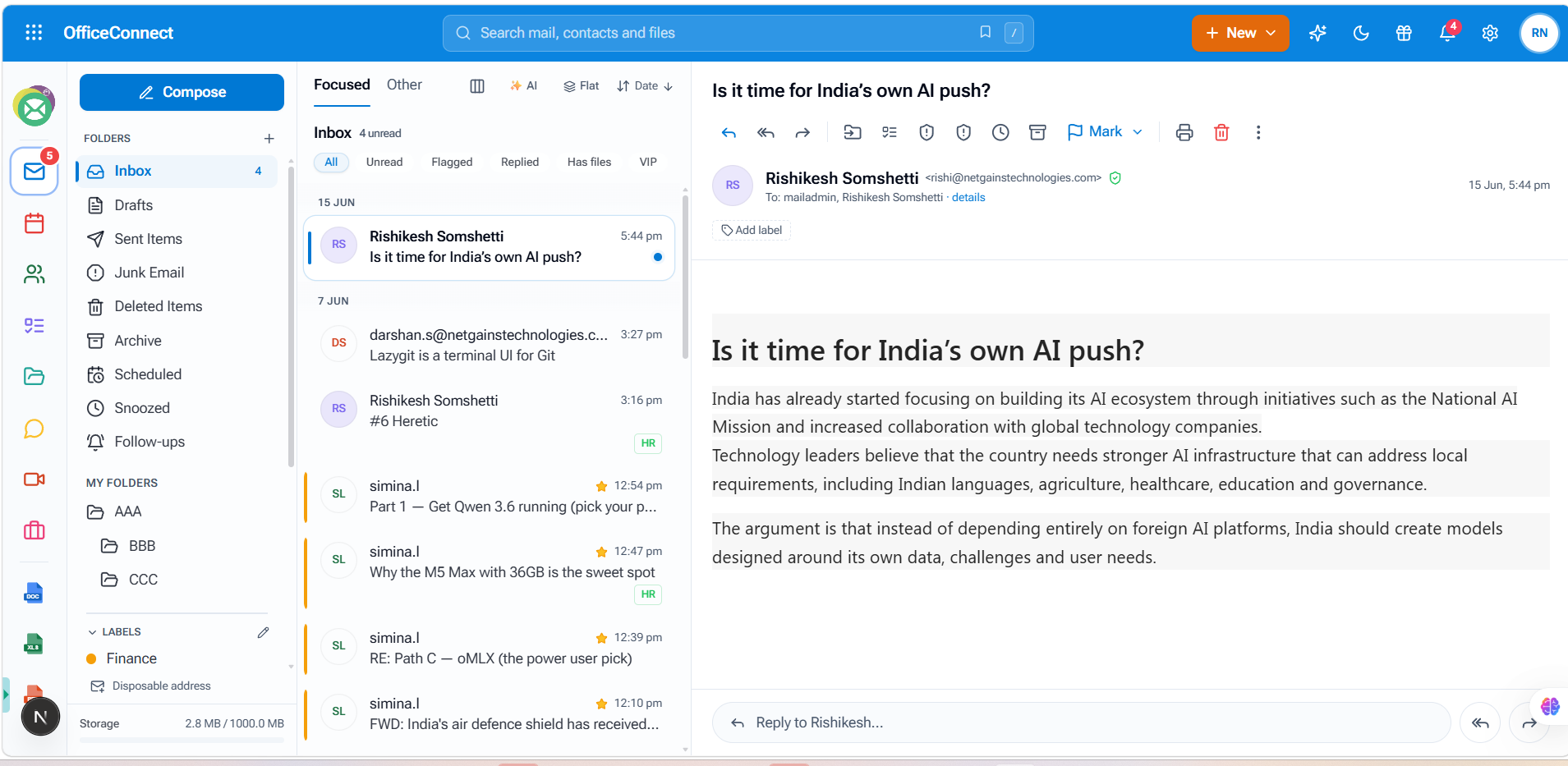
OfficeConnect inbox interface showing business email management and follow-up features.
OfficeDrive With Real Controls
File sharing gets the guardrails that plain email attachments never had, whatever platform they came from: password-protected links, one-time view access, time-limited expiry, and a complete audit trail on every share. Department folders keep sensitive material scoped to the teams that actually need it.
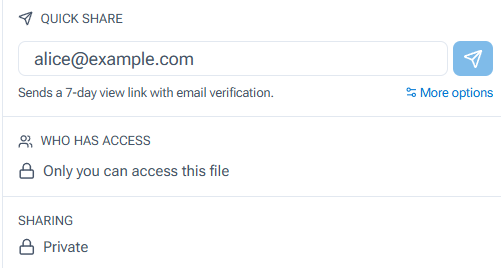
OfficeConnect file sharing controls showing secure access, permissions, and sharing options.
The same file view exposes granular sharing controls per document — who has access, when a link was opened, and a running activity log that captures every verification step a recipient goes through before they can view a file.
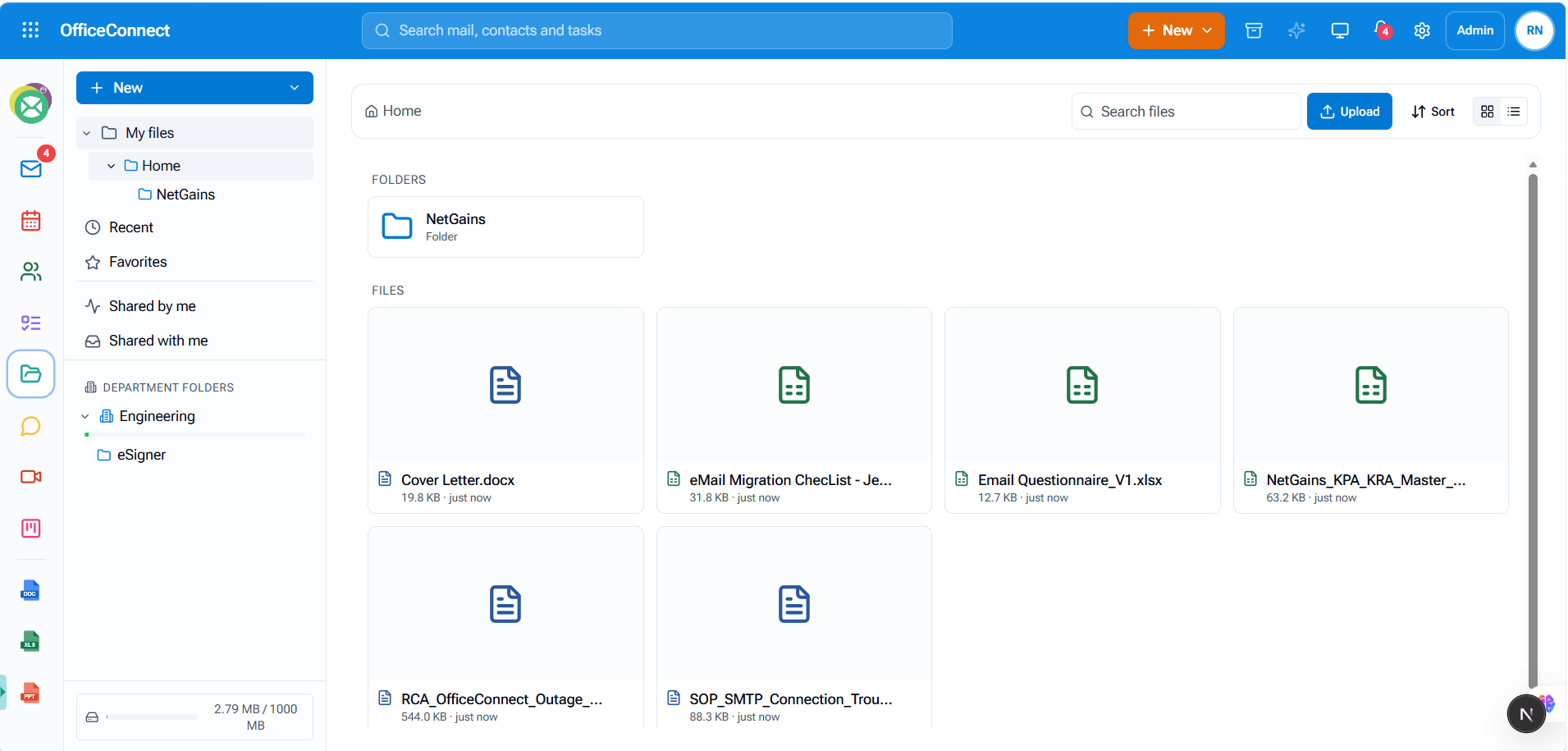
OfficeConnect OfficeDrive interface displaying shared business files and document management features.
Docs, Sheets & Slides In-Browser
Open an attachment straight from an email and edit it directly in the browser — no download, no desktop suite, and none of the extra configuration a traditional platform might otherwise require just to get partial co-authoring working.
WorkHub for Accountability
Convert any email into a tracked task with an owner, a status, and a deadline attached. Projects can be viewed as a Kanban board or a flat list, complete with progress bars, overdue counts, and a daily "My Day" summary so nothing sits forgotten in someone's queue.
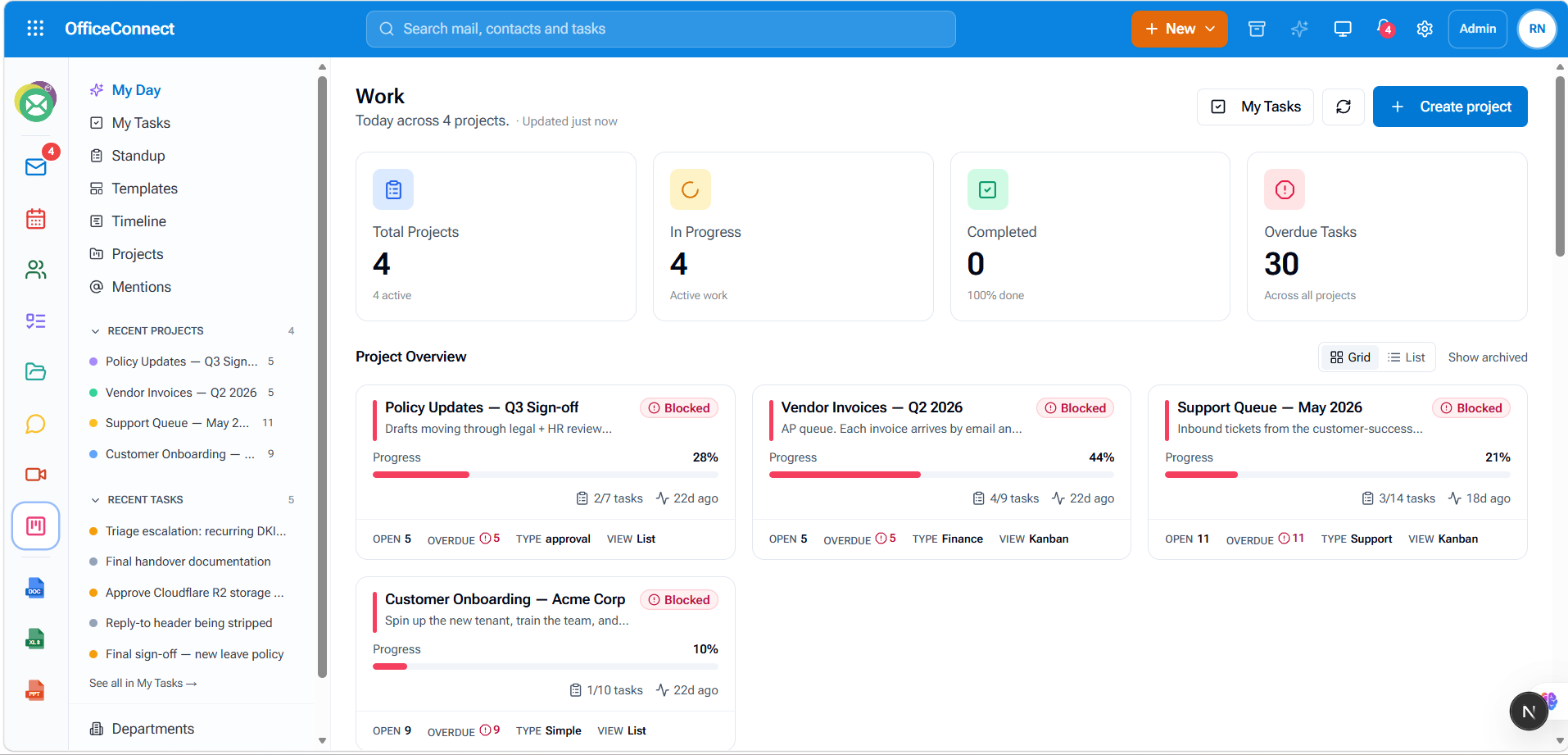
OfficeConnect WorkHub project interface showing tasks, project progress, and team workflow management.
Spin up a browser-based video call in seconds, with guest links that let external participants join without creating an account or installing anything — something most traditional webmail platforms only offer, if at all, through a third-party integration.
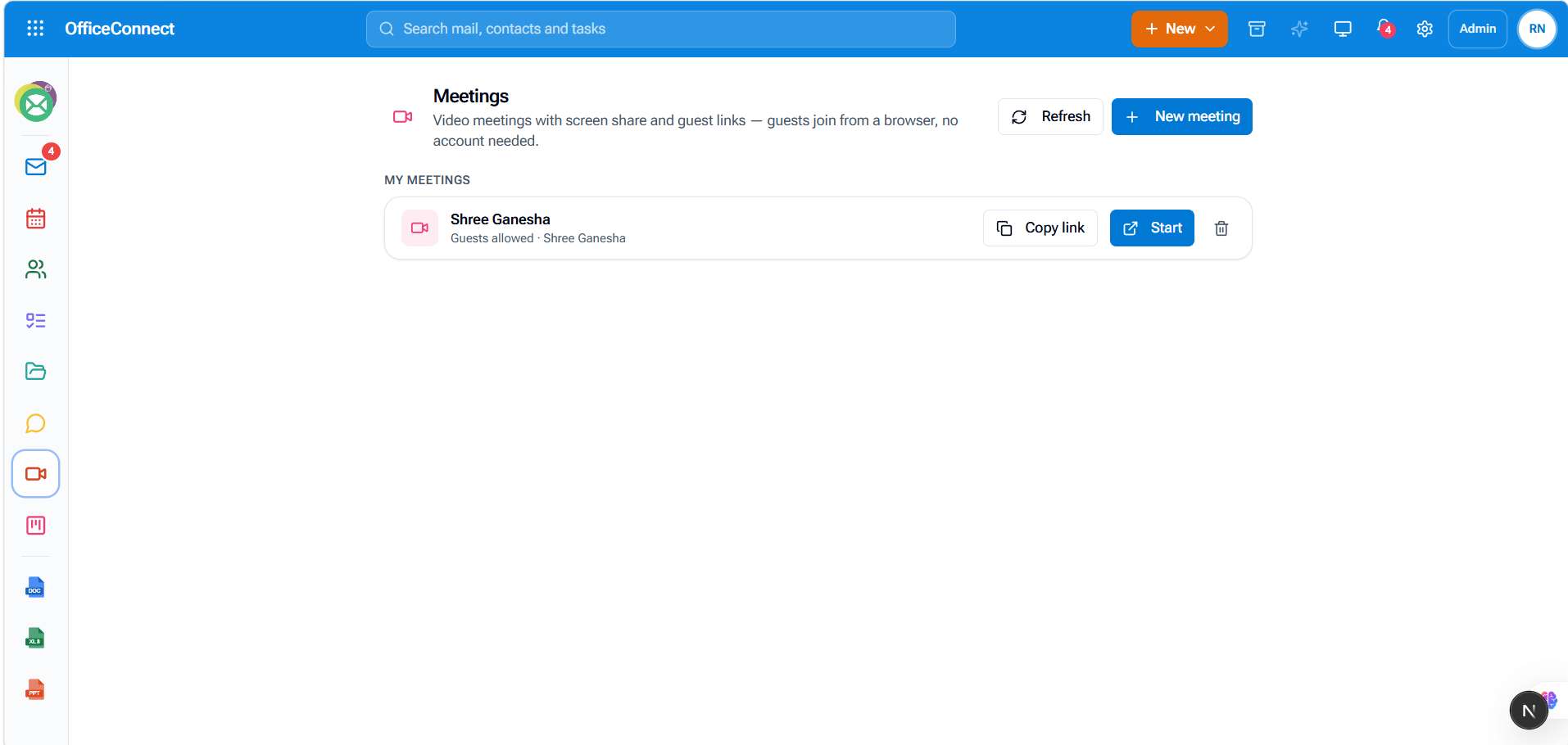
OfficeConnect browser-based meeting interface for online business video calls.
NetGains ID
One identity spans the entire workspace — plug in an existing directory (AD/LDAP) or use OfficeConnect's own, with single sign-on, two-factor authentication, and a unified audit trail across mail, files, and tasks. For businesses with data residency requirements — often the same requirement that draws Indian teams toward India-hosted email providers in the first place — OfficeConnect runs on NetGains' own FlexCloud infrastructure, co-located at NTT's Mumbai data center, meaning no hyperscaler sits in the data path at any point.
What Makes Business Email Actually Secure
"Secure email service for business" gets thrown around loosely in marketing copy. In practice, secure business email hosting should mean more than a marketing label — a genuinely secure provider should be able to point to specific, verifiable mechanisms, not just the word "secure" printed somewhere on a pricing page.
Encryption in transit
Mail should move between servers over TLS-encrypted connections, not merely display a padlock icon on the login screen.
Domain authentication
SPF, DKIM, and DMARC need to be configured correctly to prevent someone else from spoofing your domain and sending fraudulent mail that appears to come from your company.
Multi-factor authentication
A second verification step beyond a password — ideally enforced organization-wide rather than left as an optional toggle each employee may or may not switch on.
Granular access control
The ability to specify precisely who can view, edit, or download a given file, and to see a record of when that access was actually exercised — the same kind of visibility shown in the sharing panel above.
When evaluating secure business email providers, whatever platform they're currently running underneath, it's worth asking about each of these individually rather than accepting "enterprise-grade" as a sufficient answer on its own.
Business Email Pricing, Realistically
Business email pricing spans a genuinely wide range. India-hosted webmail plans can cost only a few dollars per mailbox each month, and self-hosted mail server deployments carry their own licensing and admin overhead rather than a per-seat subscription. Full productivity suites like Google Workspace or Microsoft 365 Business cost considerably more once collaboration features, file storage, and meeting tools are factored in, and those costs tend to climb further as add-ons get layered on to cover gaps in the base plan.
Where OfficeConnect fits: the platform is positioned to deliver comparable core capability to major productivity suites at a meaningfully lower cost — the idea being that a business shouldn't need to stack four or five separate subscriptions, or maintain its own mail server, just to get mail, files, docs, tasks, and meetings working together. Reach out for a quote tailored to your team size rather than estimating from a generic price list.
Frequently Asked Questions
What is the best email hosting for small business?
The right answer depends on what a small business actually needs beyond a working inbox. Traditional webmail hosting is inexpensive and handles sending and receiving competently, but growing teams typically need follow-up tracking, file-sharing controls, and task management layered on top — which is where a unified platform like OfficeConnect starts to earn its keep.
Is Microsoft business email secure?
Microsoft 365 offers a solid security baseline — encryption, authentication, and compliance tooling are all present. But real-world security also hinges on configuration choices, data residency requirements, and whether features like granular file-sharing controls are even included on your specific plan tier.
How does OfficeConnect compare to open-source or self-hosted collaboration suites?
Some of these platforms go further than others on collaboration, adding basic chat and file sharing plus third-party integrations. But task tracking, file governance with a full audit trail, and true in-browser co-authoring generally still aren't native — which is exactly the layer OfficeConnect adds.
We're already on an India-hosted email provider for data residency. Does OfficeConnect offer that too?
Yes. OfficeConnect runs on NetGains' own FlexCloud infrastructure, co-located at NTT's Mumbai data center, so data residency doesn't have to be traded off against getting a modern collaboration layer.
What makes an email service secure for business?
Look for TLS encryption in transit, domain authentication (SPF/DKIM/DMARC), multi-factor authentication, granular access controls on shared files, and a clear, timestamped audit trail — not just a password screen guarding the inbox.
What is the difference between webmail and a business email platform?
Webmail typically handles sending, receiving, and folder storage, plus whatever collaboration extras a particular vendor happens to bundle in. A business email platform adds the surrounding layer — task tracking, file governance, meetings, and identity management — which most webmail hosting was never architected to provide as its core product.
Can an existing mailbox be migrated to OfficeConnect?
Yes — moving from any webmail-hosted inbox generally involves exporting existing mail and contacts and importing them into the new platform, with DNS records (MX, SPF, DKIM) updated to point to OfficeConnect once the migration is verified. Guided migration support is available to avoid downtime during the switch.
Ready for Email That Does More Than Send and Receive?
See how OfficeConnect brings mail, files, documents, tasks, meetings, and identity into one secure workspace — built for teams that have outgrown their basic webmail setup.

NetGains Team
The NetGains Team consists of email infrastructure experts with decades of combined experience building scalable email and workplace solutions.
Leave a Reply
Comments
Loading comments...