
Microsoft 365 Email Archiving: Why Modern Businesses Need More Than Storage
For most businesses, email is far more than a way to communicate. It is a record of customer conversations, contracts, approvals, financial decisions, project discussions and day-to-day business activity. An email sent today may seem unimportant, but three years later it could become the exact record someone needs during an audit, legal investigation or customer dispute.
As this information continues to accumulate, organizations need a reliable way to retain it without allowing their Microsoft 365 environment to become overloaded with years of historical data. This is where Microsoft 365 email archiving comes in. But simply moving old messages somewhere else does not solve the entire problem. Businesses also need to be able to access historical email, search it efficiently, meet compliance requirements and make sense of what it contains.
Trove.M365 is designed to address this challenge with a live, AI-powered secondary archive for Microsoft 365. Instead of treating archived email as cold storage, Trove.M365 keeps historical communication accessible while adding intelligent search, email summarization, sentiment analysis, sensitive-data detection and compliance capabilities. The result is an approach to email archiving that focuses not only on retaining information, but also on making that information useful.
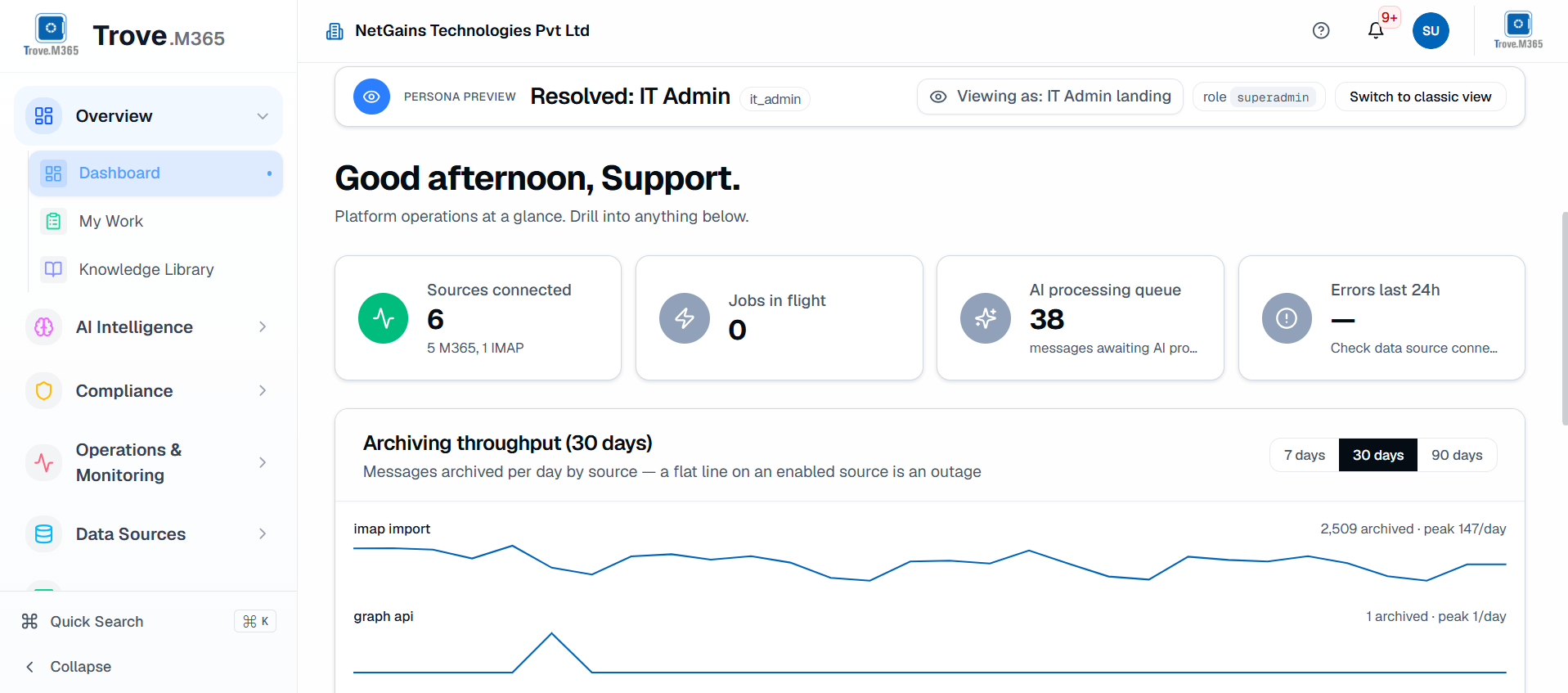
Trove.M365 dashboard showing the central workspace for managing archived Microsoft 365 communication.
Table of Contents
- What Is Email Archiving?
- Why Is Microsoft 365 Email Archiving Important?
- Why Is Traditional Email Archiving Not Enough?
- What Is a Live Email Archive?
- How Does AI Improve Email Archiving?
- How Does Semantic Search Help With eDiscovery?
- What Is Email Sentiment Analysis?
- How Does Email Archiving Support Compliance?
- Why Should Archived Email Be Part of Microsoft 365 Security and Compliance?
- Should Email Archiving Include Microsoft Teams and OneDrive?
- Why Does This Matter for Financial Services?
- What Makes Trove.M365 Different?
- What Should You Look for in the Best Email Archiving Software?
- Frequently Asked Questions
What Is Email Archiving?
Email archiving is the process of securely retaining business emails for long-term access, compliance, legal discovery and information management. Instead of keeping every message in a user's primary mailbox indefinitely, older communication can be moved to an archive while remaining available when it is needed.
For a growing organization, this can make a significant difference. Employees may accumulate years of messages containing customer information, contracts, project discussions and internal decisions. Keeping all of this data available is important, but keeping it all in primary Microsoft 365 storage is not always the most practical approach.
A good email archive therefore needs to do two things well. It should provide a controlled place for historical information while also making that information easy to retrieve. If employees have to ask IT to restore old mail every time they need a message, or if compliance teams have to search through thousands of irrelevant results to find one conversation, the archive is creating another problem instead of solving one.
This is why an archive dashboard should be more than a storage counter. Administrators need visibility into archived information, while users need an accessible way to work with historical communication.
Why Is Microsoft 365 Email Archiving Important?
Microsoft 365 gives organizations powerful tools for managing email, but the amount of data businesses generate continues to grow. A company that has been using Microsoft 365 for several years may have an enormous volume of historical email spread across primary mailboxes and archive mailboxes.
Moving older messages into an In-Place Archive can free space in a primary mailbox, but the archived data does not stop growing. Eventually, organizations may find themselves needing additional storage simply to retain older communication. This creates an ongoing cost that can increase as more data is accumulated.
A secondary archive provides another way to approach the problem. Instead of continually expanding Microsoft 365 storage, organizations can move aged data into a separate archive while retaining access to it. Trove.M365 is designed around this model, automatically moving older data from the Microsoft In-Place Archive into the Trove archive according to retention policies. This allows organizations to offload aged data while keeping historical email accessible.
The benefit is not only about reducing storage pressure. It is about having greater control over the entire lifecycle of business communication.
The goal of archiving is not simply to move old messages away. Historical communication should remain accessible, searchable and useful when the business needs it.
Why Is Traditional Email Archiving Not Enough?
Traditional email archiving solved an important problem: it gave businesses a way to retain large amounts of communication outside the primary mailbox. However, many traditional systems were built around a fairly simple idea — store the email and retrieve it when necessary.
That approach becomes less effective as organizations accumulate millions of messages.
Suppose a compliance officer needs to investigate communication surrounding a business decision from two years ago. The relevant information could be spread across hundreds or thousands of emails. A conventional archive may depend heavily on keywords, which means the person searching has to guess what words employees used when discussing the subject.
The problem is that people rarely use the same language consistently. A conversation about a contract could include words such as "agreement," "renewal," "commercial terms," "negotiation" or "revised conditions" without repeatedly using the word "contract." A keyword-based search can therefore produce too many results while still missing useful information.
This is where Trove.M365 takes a different approach. Its AI-powered search capabilities are designed to understand meaning and context, helping organizations move beyond the limitations of simple keyword matching.
Instead of treating an archive as a passive repository, Trove.M365 adds an intelligence layer that can help users understand and investigate the information stored inside it.
What Is a Live Email Archive?
One of the practical problems with traditional archives is that historical email can become difficult to access. Older systems may require IT teams to restore information or create and distribute PST files before employees can view their archived messages.
A live archive takes a different approach. Rather than treating old email as cold storage, it keeps the information available for direct access.
Trove.M365 provides live IMAP access to archived mail and preserves the original folder structure. This means users can continue to access historical email without having to go through a manual PST-based recovery process. The archive is intended to remain useful for everyday access as well as compliance and retention.
This matters more than it may seem. When an employee needs an email from several years ago, they usually do not care where the message is physically stored. They simply want to find it. A live archive makes that experience much closer to working with a normal mailbox while allowing the organization to move older data away from its primary Microsoft 365 storage.
How Does AI Improve Email Archiving?
AI changes what an archive can do with the information it stores.
Instead of treating every email as a block of text that can only be searched using exact keywords, an AI-powered archive can analyze content, understand relationships and provide additional context. Trove.M365 includes semantic search, conversational search, email summarization, sentiment analysis, PII and PHI detection and phishing detection.
Semantic search is particularly useful when dealing with large archives. Instead of searching only for an exact keyword, users can look for information based on its meaning.
For example, a legal team investigating a contract might search for:
"Find emails about the contract negotiations between January and March."
The goal is not simply to find messages containing the word "contract." An intelligent system can use the subject, context, dates, people involved and other information to identify communication that is more likely to be relevant.
This can make a major difference when dealing with large archives. The purpose is not to replace human review, but to help people get to the relevant information faster.
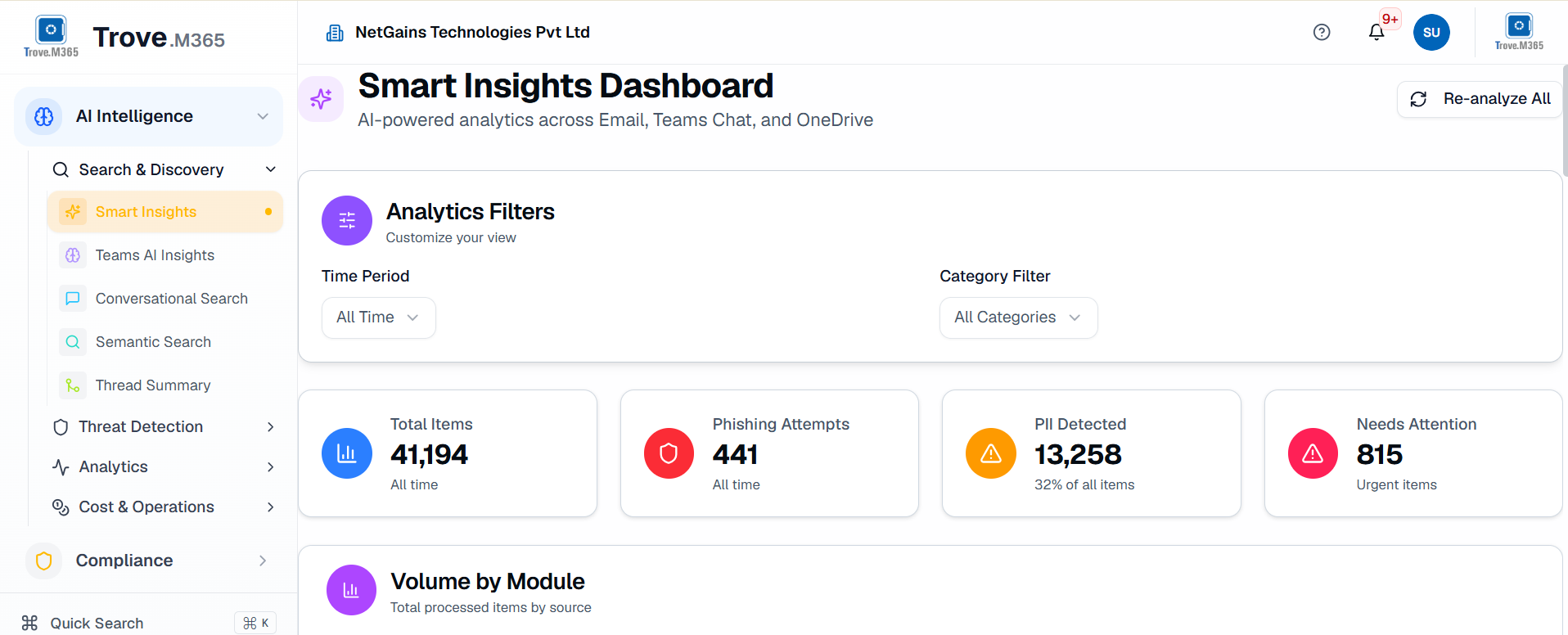
Trove.M365 Smart Insights dashboard illustrating how AI can surface useful information from archived communication.
How Does Semantic Search Help With eDiscovery?
eDiscovery can become difficult when an organization has years of archived communication. The more information there is, the harder it becomes for investigators to identify the messages that actually matter.
Traditional keyword search might return every message containing a particular project name. With Trove.M365, an AI-powered approach can take additional context into account. For example, a user could look for communication about contract discussions for a particular project during a specific period. The system can use factors such as entities, dates, senders, categories and the meaning of the conversation to identify more relevant results.
Trove.M365's approach to AI-powered legal hold is built around this idea. Instead of returning every message that contains a literal keyword, it can use semantic, entity-aware and context-aware search to identify relevant communication. It also supports bulk selection of relevant messages for legal hold.
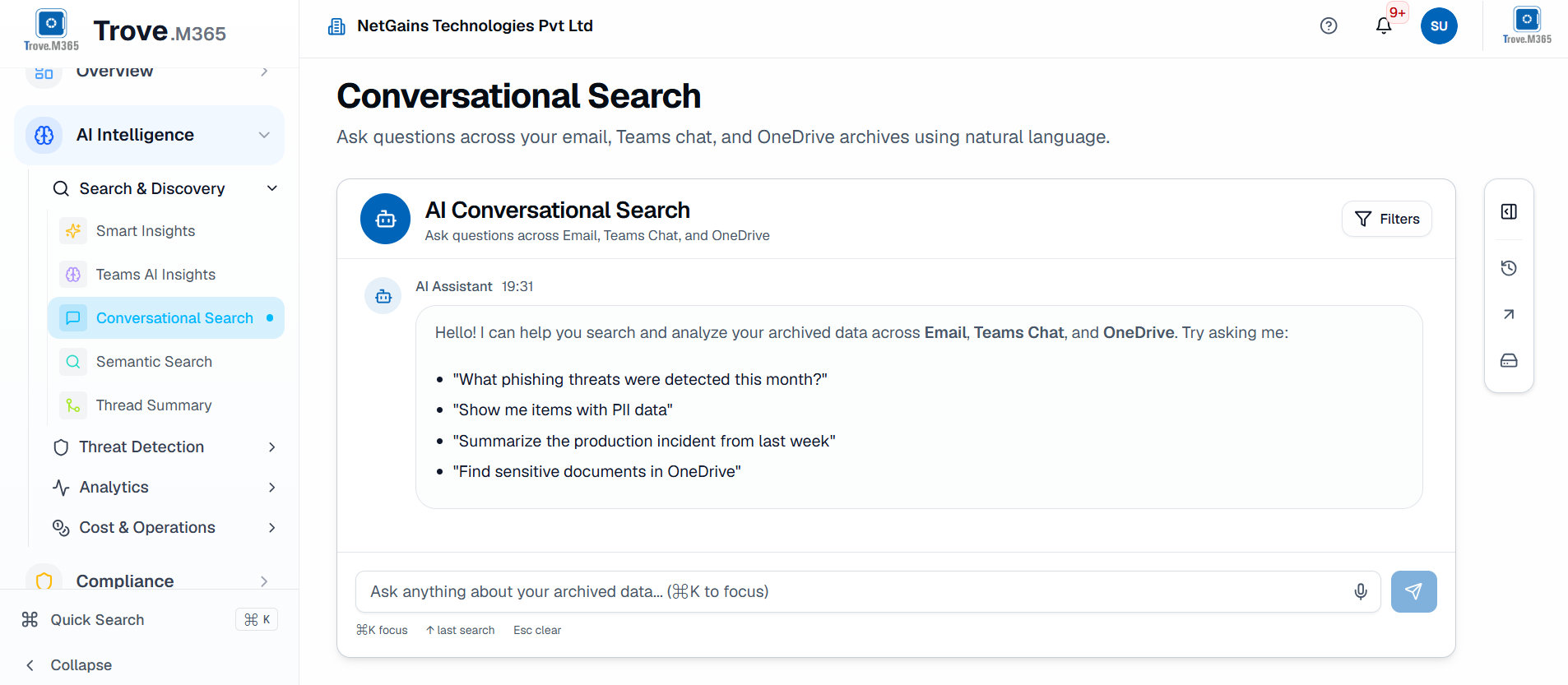
Trove.M365 conversational search interface showing how users can describe what they need using natural-language queries.
For legal and compliance teams, this can reduce the amount of time spent sorting through irrelevant information and make investigations more manageable.
What Is Email Sentiment Analysis?
Not every important email contains an obvious keyword.
Sometimes the tone of a conversation tells you more than the subject line does.
Consider a customer relationship that has gradually become difficult. The emails may not contain a phrase such as "customer is unhappy," but the conversation may show increasing frustration, urgency or concern. Looking at the words alone may not immediately reveal the pattern.
Trove.M365 includes email sentiment analysis to help identify the tone and emotional signals within communication. This can help users investigate communication based on its tone as well as its subject.
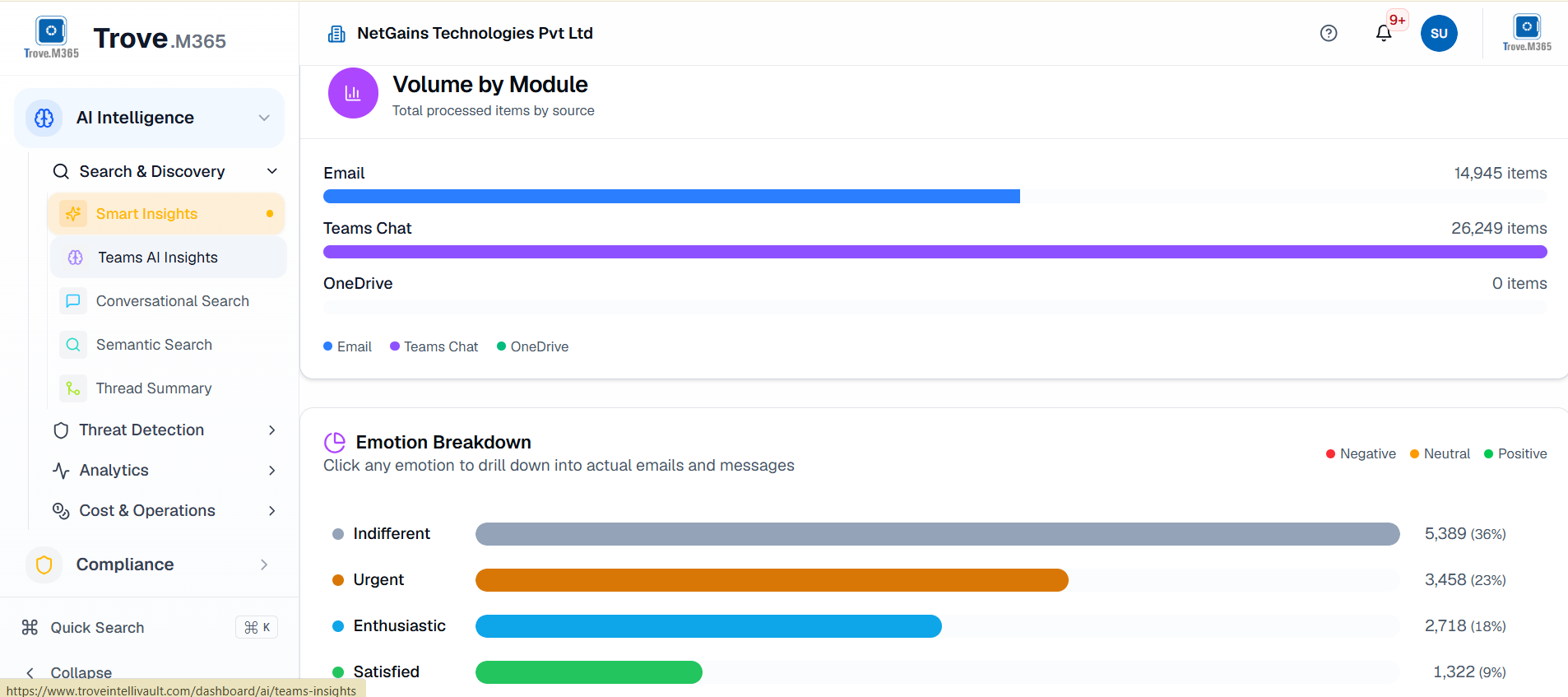
Trove.M365 AI insights view demonstrating how intelligent analysis can add context to archived communication.
This can be useful for customer relationships, internal investigations, compliance reviews and other situations where the tone of a conversation provides important context. AI does not replace human judgment, but it can help people identify which conversations deserve closer attention.
How Does Email Archiving Support Compliance?
Email retention is often closely connected to legal and regulatory requirements. Businesses may need to preserve communication for a defined period, respond to legal requests, support investigations or provide records during an audit.
This is where email archiving compliance becomes more than simply keeping old messages.
A useful archive should help an organization find and manage information when it is required. It should support processes such as legal holds, eDiscovery and data subject requests while providing an auditable record of what has been retained and how it has been handled.
Trove.M365 includes legal hold, DSAR processing, breach notification and audit trails alongside AI capabilities for identifying PII and PHI. This makes the archive part of a wider Microsoft 365 security and compliance strategy rather than a separate storage system that simply sits in the background.
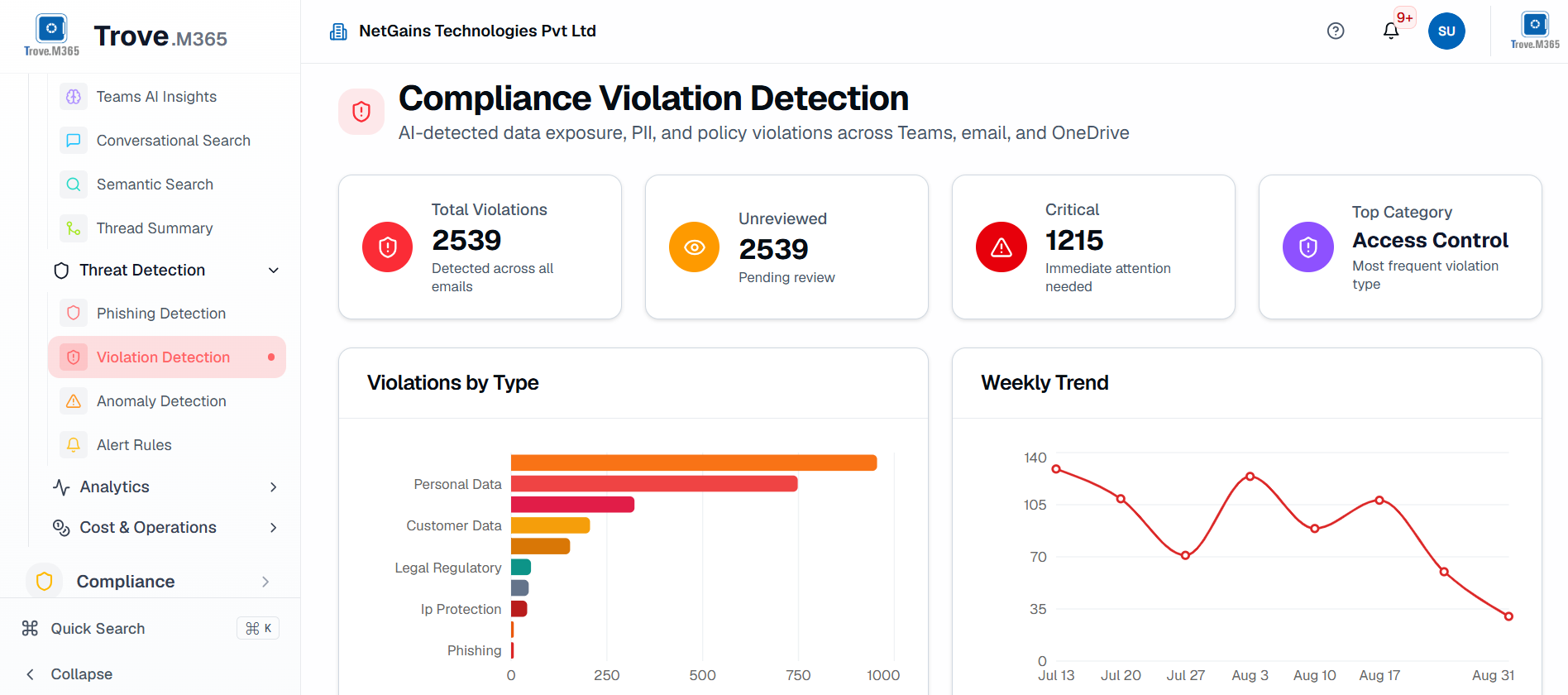
Trove.M365 compliance violation detection view highlighting communication that may require compliance review.
Why Should Archived Email Be Part of Microsoft 365 Security and Compliance?
Archived email can contain the same sensitive information as an active mailbox. In some cases, it may contain even more historical information because it represents years of business communication.
An old message could contain customer details, financial information, personal information, health-related information or confidential business discussions. If the organization has retained that information, it also needs a way to understand and manage what is inside it.
AI-based detection can help. Trove.M365 includes PII and PHI detection as well as phishing detection, allowing archived communication to be examined for information that may require attention.
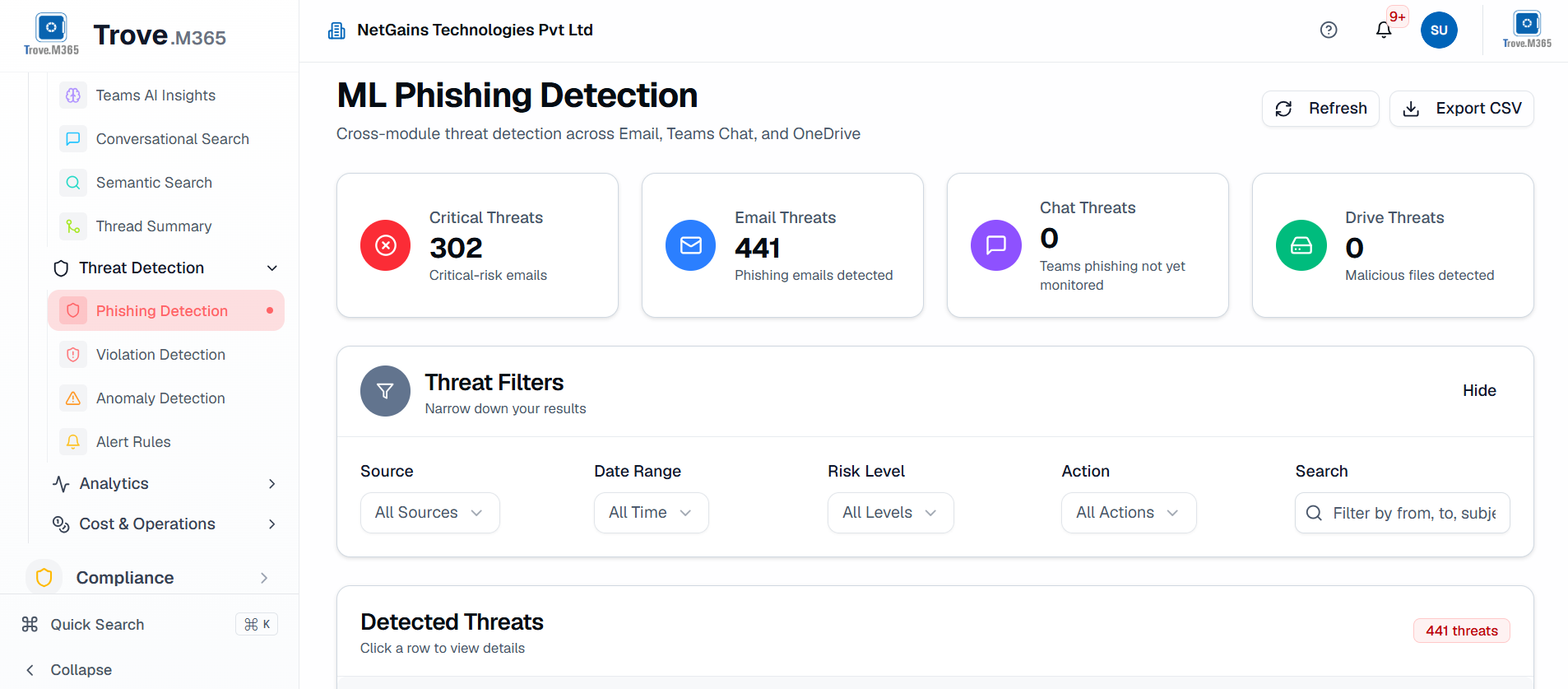
Trove.M365 phishing detection view showing how archived communication can be examined for potential malicious activity.
This is an important shift in thinking. Security and compliance should not stop at the active mailbox. Historical communication can remain relevant long after it has been archived.
Should Email Archiving Include Microsoft Teams and OneDrive?
For many businesses, email is only one part of the communication record.
A project may begin with an email, continue in a Microsoft Teams chat and eventually result in a document being shared through OneDrive. If those systems are managed separately, it can be difficult to understand the complete history of an event or decision.
This is why modern Office 365 email archiving solutions need to consider the broader Microsoft 365 environment. Trove.M365 provides coverage for Exchange Online, Teams chats and channels, and OneDrive file synchronization, helping organizations manage communication and related information across multiple Microsoft 365 services.
Trove.M365 Teams AI insights view illustrating intelligent analysis of Microsoft Teams communication.
Bringing these sources into a broader archiving and governance strategy can give organizations a more complete view of their communication. For eDiscovery, compliance and investigations, that context can be extremely valuable because the information someone needs may not be contained in an email alone.
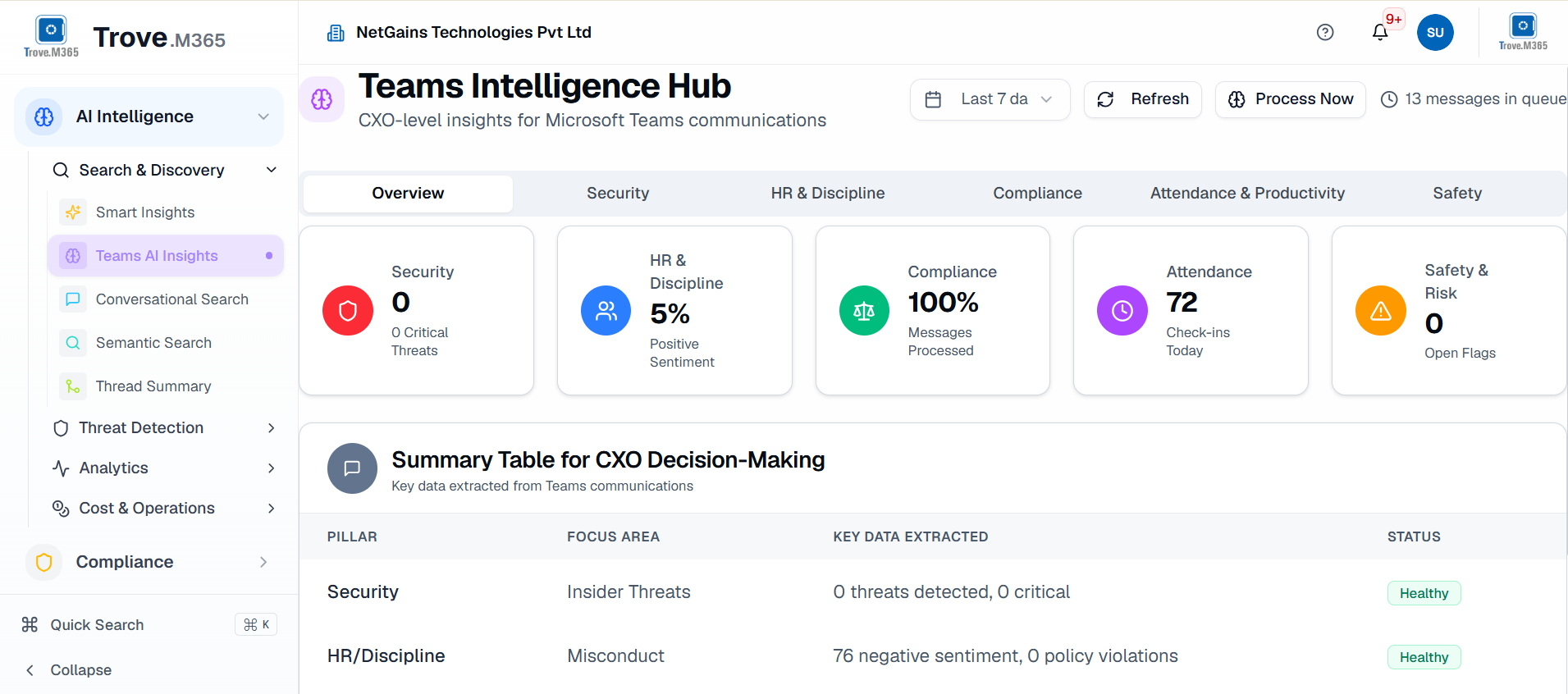
Trove.M365 Teams Intelligence Hub showing a broader view of Microsoft Teams communication and related intelligence.
As communication moves between Exchange Online, Teams and OneDrive, having those sources available within a broader archiving strategy can make investigations easier to understand and manage.
Why Does This Matter for Financial Services?
Few industries can afford to treat business communication as disposable information.
Financial services organizations deal with large volumes of customer communication, financial information, internal decisions and regulated records. They may also face strict requirements around retention, privacy, auditing and investigations.
This makes financial services email archiving software more than a storage tool. The archive needs to help organizations retain communication while making it possible to find relevant information quickly. AI-powered search, sensitive-data detection, legal hold and audit capabilities can become particularly useful when compliance teams need to work through large amounts of historical communication.
The same principle applies to other highly regulated industries. The more communication an organization creates, the less practical it becomes to rely on storage and basic keyword search alone.
What Makes Trove.M365 Different?
Trove.M365 is built around a simple idea: archived communication should remain useful. It combines a live secondary archive with AI-powered intelligence, Microsoft 365 coverage and compliance controls, giving organizations more than a place to store old email.
Some of the capabilities that make Trove.M365 different include:
- Live secondary archiving: Historical email remains accessible through IMAP rather than being treated as cold storage.
- Automated storage offloading: Aged data can be moved from Microsoft 365 archive storage into the secondary archive.
- Preserved folder structure: Users can retain the familiar organization of their historical email.
- Semantic search: Searches can focus on meaning and context rather than exact keywords.
- Conversational search: Users can describe what they are looking for using natural language.
- Email summarization: Long threads and content can be summarized to make review faster.
- Email sentiment analysis: AI can identify tone and emotional signals within communication.
- PII and PHI detection: Sensitive information can be identified within archived content.
- Phishing detection: Archived communication can be analyzed for potential malicious activity.
- Legal hold and DSAR processing: Compliance and governance teams have tools to manage important requests.
- Microsoft Teams and OneDrive coverage:Communication and related information can be managed beyond the traditional mailbox.
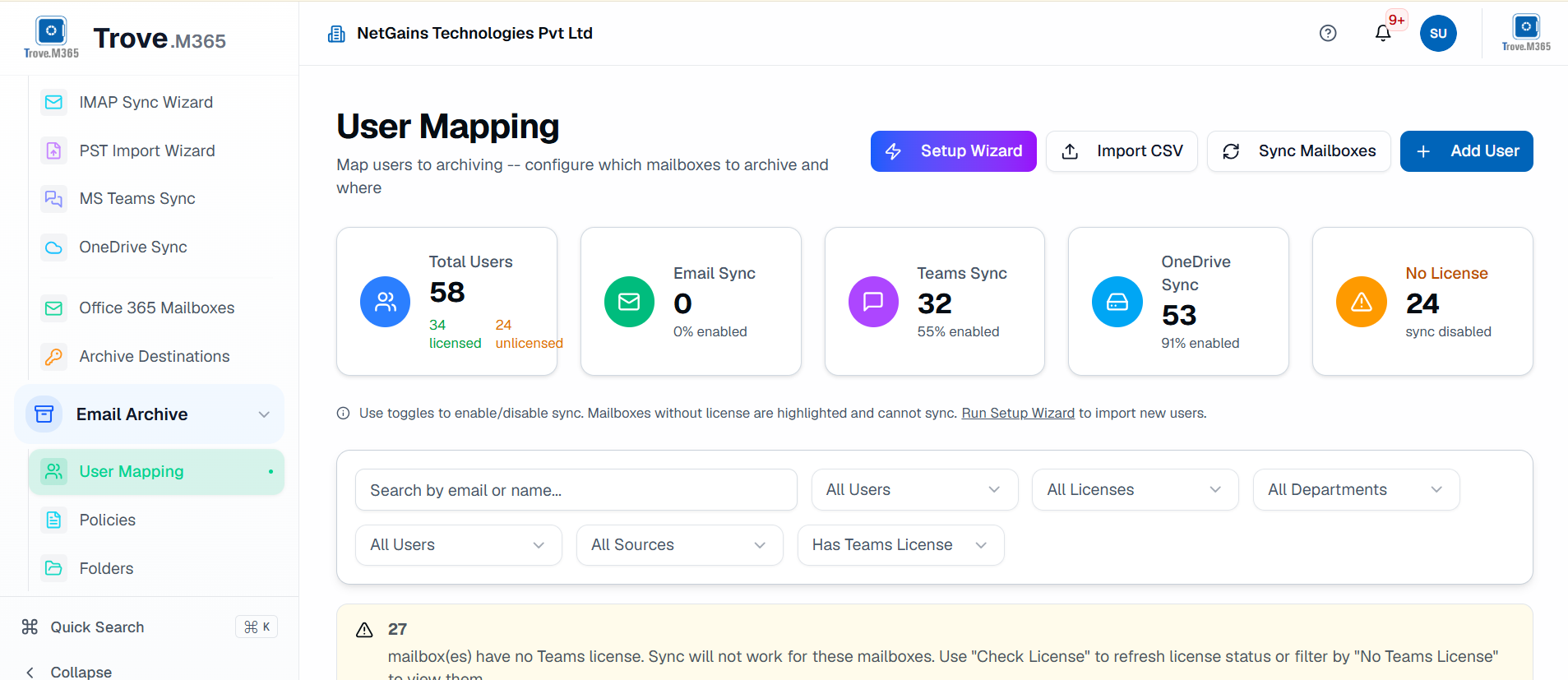
Trove.M365 user mapping interface showing how Microsoft 365 users can be associated with the archive environment.
User and identity management becomes particularly important when archived communication is being accessed by employees, administrators, compliance teams and investigators. Keeping users correctly associated with their archived information helps make historical communication easier to manage.
Together, these capabilities change the purpose of the archive. It is no longer simply a place to move old messages when a mailbox becomes full. Trove.M365 turns the archive into an accessible, intelligent layer for managing and understanding business communication.
What Should You Look for in the Best Email Archiving Software?
When comparing the best email archiving software, storage capacity is an obvious consideration, but it should not be the only one. An archive may be able to store enormous amounts of data and still be difficult to use when someone actually needs that information.
Organizations should consider whether historical email can be accessed without complicated restoration processes, whether the original folder structure is maintained and whether IT teams can avoid the ongoing burden of managing PST files. Search is equally important. If finding a relevant message depends entirely on remembering the exact words someone used years ago, large archives can quickly become difficult to work with.
For businesses evaluating an email archiving solution, the following capabilities are worth considering:
- Easy access to historical email
- Automated retention and storage management
- Semantic and natural-language search
- AI-powered eDiscovery
- Legal hold capabilities
- Email summarization
- Email sentiment analysis
- PII and PHI detection
- Security and phishing detection
- Audit and compliance controls
- Microsoft Teams and OneDrive support
- Minimal manual PST management
The right choice ultimately depends on the organization's requirements, industry and data volume. For regulated businesses in particular, the archive should be considered part of the organization's broader information governance strategy rather than simply another storage product.
Frequently Asked Questions About Microsoft 365 Email Archiving
What is Microsoft 365 email archiving?
Microsoft 365 email archiving is the process of moving or retaining older business emails in an archive so they remain available for long-term access, compliance, discovery and information management. It can help organizations reduce pressure on primary mailboxes while maintaining access to historical communication. Trove.M365 provides a live secondary archive for this purpose, allowing older email to remain accessible while helping organizations manage Microsoft 365 storage growth.
Is email archiving the same as backup?
No. Backup is primarily intended for recovering data after deletion, loss or system failure. Archiving is designed for long-term retention and access to business communication. Modern archives can also provide search, compliance, eDiscovery and AI-based analysis, making archived information useful rather than simply recoverable.
Can email archiving reduce Microsoft 365 storage costs?
It can help control storage costs by moving older data out of Microsoft 365 storage into a secondary archive. Trove.M365 is designed to automatically offload aged email according to retention policies while keeping the information accessible through its live archive.
What is the difference between traditional and AI-powered email archiving?
Traditional archiving generally focuses on storing and retrieving messages, often using keyword-based search. AI-powered archiving can add semantic search, natural-language queries, summarization, sentiment analysis and automated detection of sensitive information. Trove.M365 combines these AI capabilities with live archiving and Microsoft 365 coverage, allowing organizations to work with the meaning and context of their communication rather than simply storing it.
What is email sentiment analysis used for?
Email sentiment analysis helps identify the tone of communication, such as signs of frustration, urgency or concern. Trove.M365 uses email sentiment analysis to help organizations identify communication that may deserve closer attention, particularly when reviewing customer communication, internal discussions or potential risks.
How does AI help with eDiscovery?
AI can help eDiscovery teams find relevant communication by considering context and meaning rather than relying only on exact keywords. This can reduce the number of irrelevant results and make large-scale investigations easier to manage. Trove.M365 supports semantic and conversational search as well as AI-powered legal hold capabilities.
Does email archiving support compliance?
Yes. Email archiving can support retention, legal hold, eDiscovery, audits and other governance processes. Modern platforms can also add capabilities such as PII and PHI detection, DSAR processing and audit trails to help organizations manage archived information more effectively. Trove.M365 combines these capabilities within its broader AI-powered archiving platform.
Why should Microsoft Teams be included in an email archive?
Important business decisions and conversations increasingly take place in Microsoft Teams rather than email alone. Trove.M365 archives Microsoft Teams chats and channels alongside Exchange Online and OneDrive, helping organizations maintain a more complete record of business communication and making it easier to investigate events where information is spread across multiple Microsoft 365 services.
What should businesses consider when choosing an email archiving solution?
Businesses should look beyond storage capacity and consider accessibility, search, compliance, security, retention management and integration with the systems employees already use. AI capabilities such as semantic search, summarization and email sentiment analysis can also make large archives much more useful. Trove.M365 brings these capabilities together in a single Microsoft 365-focused archiving and intelligence platform.
Make Your Microsoft 365 Archive More Intelligent
Trove.M365 brings together live secondary archiving, Microsoft 365 coverage, AI-powered search, intelligence, security and compliance capabilities so historical business communication remains accessible and useful.

NetGains Team
The NetGains Team consists of email infrastructure experts with decades of combined experience building scalable email systems.
Leave a Reply
Comments
Loading comments...